Trifold Back to School Brochure Template: A Practical Tool for Streamlined School Communications
Every academic year brings the same challenge: communicating essential information clearly and attractively to families, students, and staff. Whether you are a school administrator drafting orientation materials, a PTA volunteer organizing event flyers, or a freelance designer serving educational clients, the quality of your printed materials reflects directly on the institution. That is why a well-structured template can save hours of layout work while ensuring professional results. The Trifold Back to School Brochure Template offers exactly that kind of starting point, combining print-ready specifications with full customizability. But does it deliver on its promise of ease and flexibility? Let's examine what this template actually provides, who benefits most, and where you might encounter its practical limits.
What the Trifold Back to School Brochure Template Offers
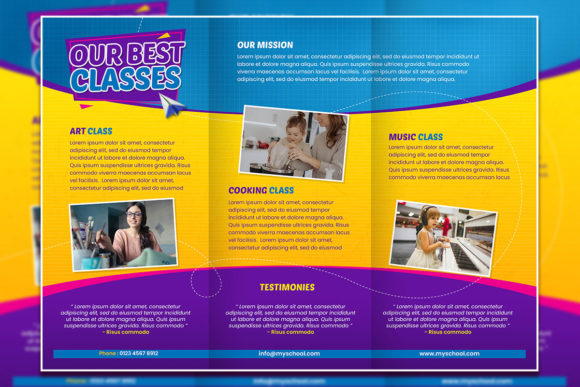
At its core, this template is a layered Adobe Photoshop file designed specifically for back-to-school communications. The format is a classic trifold brochure, which folds into three panels and fits comfortably in a standard envelope or handout stack. The key specifications include 300 DPI resolution, an RGB color profile, A4 page dimensions, and a 0.25-inch bleed area. These details matter because they define whether your final printed piece looks crisp and professional or soft and amateurish.
The template comes as a single PSD file with 100% layered and fully editable content. Every text block, shape, color overlay, and design element sits on its own layer, which means you can turn visibility on or off, rearrange elements, or completely replace the placeholder graphics. The file uses 100% free fonts, so you can download the exact typefaces used in the design without extra licensing costs. This is a thoughtful inclusion because font licensing surprises can derail a project budget.
One critical detail often overlooked in template descriptions: the product includes no stock photos or images. The preview shows placeholder visuals, but you must supply your own photography. The description explicitly states this limitation, which is honest rather than misleading. For experienced users, this is standard practice. For newcomers, it is worth noting upfront so you can plan to source appropriate images before you begin editing.
Print-Ready Specifications Without Guesswork
The 300 DPI resolution combined with the 0.25-inch bleed area means you can send this file directly to a commercial printer without additional adjustments. Many template sellers provide 150 DPI files or omit bleed entirely, which forces users to rebuild the layout for professional output. This template removes that friction. The A4 format is widely accepted in many regions and by most online print services, making it a practical choice for international schools or organizations that work across borders.
The RGB color profile deserves a brief note here. RGB is standard for digital screens, while CMYK is the conventional choice for offset printing. However, many modern digital printers accept RGB files and handle the conversion internally. If you plan to use a high-end offset print run, you may need to convert the profile yourself. For the vast majority of school printing jobs laser printers, short-run digital presses, or local copy centers RGB works perfectly fine. Just be aware that the final colors may shift slightly during conversion, so a test print is always wise.
Full Layering Means Genuine Customization
Not all editable templates live up to the claim. Some PSD files ship with merged or rasterized layers that limit what you can actually change. In this template, the layers are fully intact. You can alter typography, swap color schemes, adjust spacing, replace icons, and restructure the layout hierarchy. This is particularly valuable if you need to adapt the same brochure for multiple audiences: a version for elementary parents, another for high school orientation, and a third for staff training materials. You can build one master file and duplicate layers to maintain consistency across variations.
For designers, layered files also allow you to apply effects selectively. Drop shadows, gradient overlays, or texture masks can be added to specific elements without affecting the rest of the layout. This level of control is what separates a professional-grade asset from a basic DIY template.
Font Freedom Reduces friction
The use of free fonts may seem like a minor detail, but it eliminates a common bottleneck. Licensed commercial fonts often require separate purchase and installation, and if you distribute the editable file to colleagues or clients, font availability becomes a compatibility issue. With free fonts, everyone involved can install the same typefaces without legal or financial barriers. The template description notes that the fonts are 100% free, so you can verify the licenses on Google Fonts or similar repositories before committing to the design.
School Administrators and Educators
If you manage communications for a K–12 school, this template fits naturally into your workflow. Back-to-school nights, orientation programs, open houses, and enrollment drives all require printed materials that convey professionalism and warmth. The trifold format gives you room to include welcome messages, staff introductions, bell schedules, supply lists, and contact information, all in a single sheet that parents can keep or pin to the fridge. The editable layers allow you to update the content each year without rebuilding the layout from scratch.
Freelance Designers and Marketing Professionals
For designers who serve multiple school clients, this template can serve as a foundation for repeat work. You can create a custom color palette and typography set that aligns with each school's branding, then reuse the structure semester after semester. The A4 bleed specification ensures that your files meet print shop requirements, reducing back-and-forth corrections. Because the PSD is fully layered, you can also offer clients a range of variations without starting from zero each time.
PTA Volunteers and Small School Nonprofits
Volunteers often produce communication materials with limited design experience and tight deadlines. A template that includes proper bleed, resolution, and font information removes the guesswork. You can focus on writing clear content and choosing appropriate photos rather than learning the technicalities of print prep. The only prerequisite is basic familiarity with Photoshop layers: turning visibility on and off, moving text boxes, and replacing images. If you have never used layers before, a short tutorial session will cover what you need.
Limitations and Practical Considerations
No template is perfect for every situation, and this one has a few constraints worth acknowledging. The primary limitation is the lack of included imagery. While this is standard for many professional templates, it does mean you must either own applicable photographs, have access to a stock photo subscription, or arrange a photoshoot. If you are creating materials for a school, you likely have access to campus photos, student activity shots, or staff portraits. Plan to gather those images before you begin editing.
Another consideration is the software requirement. This file is a PSD, which means you need Adobe Photoshop or a compatible alternative. If your workflow relies on Affinity Publisher, Canva, or InDesign, you may need to convert the file or look for a format that aligns with your tools. That said, Photoshop remains the industry standard for raster-based layouts, so many users already have access.
The RGB color profile, as mentioned earlier, may require conversion for certain print processes. If your printer specifically demands CMYK files, factor in the conversion step and budget for a proofing cycle. For most digital and laser print jobs, this is not an issue, but it is worth confirming with your print provider upfront.
Long-Term Value and Return on Investment
Templates like this one deliver value not just in the time saved during the first edit, but in the reusable framework they provide. You can archive the final PSD for the current school year, then reopen it for the next cycle, updating only the date, relevant events, and new images. If your school or organization has established brand guidelines, you can save a branded version of the template and distribute it to multiple departments, ensuring visual consistency across all print communications.
The 300 DPI resolution ensures that even if you scale the layout slightly or print at larger than standard size, the quality remains acceptable. The bleed area gives print services room to trim without cutting into your content. These are details that save you from costly reprints or last-minute layout fixes.
Is This Template Right for Your Project?
If your goal is to produce a clean, professional trifold brochure for back-to-school use, and you have access to Photoshop and your own photos, this template provides a solid foundation. It respects industry print standards, gives you full control over the design, and avoids the common pitfalls of incomplete or overpromised templates. The free font policy and layered structure make it suitable for both solo users and collaborative teams.
For those who need a faster solution with included stock photography or who work exclusively in browser-based tools, this template may require extra preparation steps. But for anyone comfortable with Photoshop layers and ready to supply their own imagery, the Trifold Back to School Brochure Template offers a practical, time-saving asset that performs reliably in real-world school communications.